Powered by Apple Intelligence + Whisper AI

Transcribe, Summarize & Translate Audio with AI

Transform your meetings, interviews, and recordings into text. Get AI summaries in any language - even summarize English audio in German. Translate to 34 languages with preserved timestamps for subtitles. 100% private - everything runs on your device.

Requires iOS 26+ / macOS 26+ with Apple Intelligence

34+
Languages
100%
Private
$0
Subscription
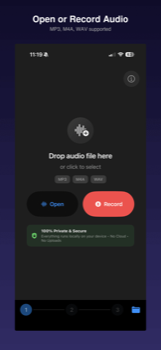
How It Works

Three simple steps to transform your audio into text

1

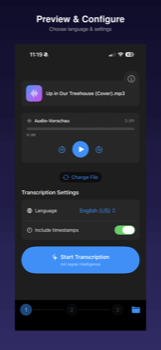
Record or Import

Record audio directly, import audio files (MP3, M4A, WAV), or load video files (MP4, MOV)

2

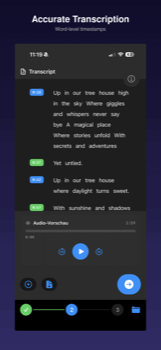
Transcribe & Translate

AI transcribes your audio with timestamps, then translates to any language

3

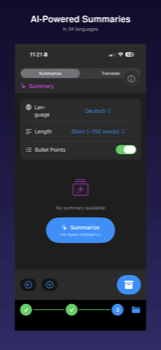
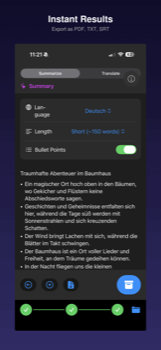
Summarize & Export

Get AI summaries and export as PDF, SRT/VTT subtitles, or text

+
Transkript
Perfect Workflow

The Best Companion for Voice Memos

Record with Apple's Voice Memos app, then share directly to Transkript for instant transcription. The perfect combination: professional recording quality meets AI-powered transcription.

  • 1 Record in Voice Memos with Apple's optimized audio quality
  • 2 Tap Share and select Transkript
  • 3 Get your transcript, summary & translation instantly

Who Uses Transkript?

Trusted by professionals, students, and anyone who needs fast, private audio-to-text conversion

🎙️

Podcasters & Content Creators

Turn your episodes into searchable transcripts and engaging show notes. Create multilingual subtitles for YouTube and social media to reach a global audience. Save hours of manual transcription work.

SRT/VTT Export
📰

Journalists & Researchers

Transcribe sensitive interviews with complete source confidentiality — no cloud servers, no data leaks. Search through hours of recordings instantly. Export quotes with precise timestamps for fact-checking.

100% Offline
🎓

Students & Academics

Never miss a lecture detail again. Record with Voice Memos, then get AI-powered summaries highlighting key concepts. Create searchable study notes and translate content from foreign language courses.

AI Summaries
💼

Business Professionals

Document meetings, client calls, and brainstorming sessions without cloud privacy concerns. Get executive summaries in seconds. Keep confidential discussions completely private and under your control.

GDPR Compliant
👩‍🏫

Teachers & Educators

Document parent-teacher conferences with parental consent. Record the conversation, then generate a summary for your records with one click. Important: Always be transparent — share audio and summary with parents on request. Never record without explicit consent.

One-Click Summary
👂

Accessibility & Language Learning

Generate subtitles for any video to make content accessible for the deaf and hard of hearing. Translate subtitles to your native language to watch foreign films, tutorials, or lectures with ease. Perfect for language learners who want to read along.

34 Languages

Powerful Features

Everything you need to transcribe, summarize, and translate your audio

Video to Subtitles

Load MP4 or MOV videos, automatically extract audio, and create SRT/VTT subtitles in the original language or translated to 34 languages.

Audio Transcription

Transcribe MP3, M4A, WAV files with word-level timestamps. Perfect for meetings, interviews, and lectures.

Two AI Engines

Choose between Apple Intelligence (recommended) or OpenAI Whisper for even more languages and higher accuracy. Both run 100% offline on your device.

Translation to 34 Languages

Translate your transcript while preserving timestamps. Export as SRT subtitles for your videos.

AI Summaries

Generate intelligent summaries of your transcripts in multiple languages. Choose your preferred length.

Voice Memos Integration

Record in Apple's Voice Memos app, then share directly to Transkript. The perfect workflow for professional recordings.

Multiple Export Formats

Export as TXT, SRT/VTT subtitles, JSON, or PDF. Share directly or save to your library.

100% Private

All processing happens on-device using Apple Intelligence. No cloud uploads, no data collection.

Siri & Shortcuts

"Hey Siri, start recording in Transkript" - Full voice control and automation via Shortcuts app.

Control Center Widgets

Quick-launch buttons in iOS Control Center. Start recording or transcription with one tap.

Library Management

Save transcriptions to your library. Organize, search, and access them anytime with iCloud sync.

Your Data Stays on Your Device

Transkript uses Apple Intelligence or OpenAI Whisper – both run entirely on your iPhone, iPad, or Mac. Your audio files and transcriptions never leave your device.

  • No cloud processing
  • No account required
  • No data collection
  • No subscription fees

Supported Languages

Transcribe in major languages, translate to 34+ languages

English Deutsch Français Español Italiano Nederlands Português Svenska Norsk Dansk Suomi Polski Česky Magyar Japanese Korean Chinese Arabic Hindi Thai Vietnamese Indonesian Turkish Greek Hebrew Russian Ukrainian + more

Ready to Transform Your Audio?

Join thousands of users who trust Transkript for private, on-device transcription

Download on the App Store

Free Download - No Subscription Required

Requires iOS 26+ or macOS 26+ with Apple Intelligence enabled